This is one of the most expensive decisions a business owner makes about their website, and most people make it based on the wrong information.
Some business owners rebuild a website that only needed targeted fixes. They spend $8,000 and six months on a new site when $1,500 worth of messaging and conversion work on the existing one would have produced better results faster. Others keep patching a site with structural problems, spending $3,000 in incremental fixes over two years before eventually rebuilding anyway, having lost leads the entire time.
Both are avoidable mistakes if you know what to look for before you decide.
A website redesign is a complete overhaul of the site's structure, design, and content. A website refresh makes smaller, targeted updates to specific elements without changing the core framework. And a full rebuild starts from scratch on a new platform with a new architecture. These are three different products with three different price points and three different timelines. Understanding which one you actually need before you talk to anyone is the most valuable thing this article can give you.

Start With the Right Question
How do I know if my website needs a redesign or just updates?
The question most business owners ask is "does my website look outdated?" That is the wrong question.
The right question is: "Is my website structurally capable of doing what my business needs it to do?"
A site can look dated and still function well. A site can look modern and perform terribly. Visual age is not the same as functional failure. Before you decide between fixing and rebuilding, you need to separate the surface problems from the structural ones.
Surface problems are things like outdated visual styling, weak copy, missing trust signals, generic calls to action, and thin content. These live at the top layer and can almost always be addressed without touching the underlying structure.
Structural problems are things like a platform that cannot support proper mobile optimization, a codebase so bloated it can never load quickly regardless of optimization, a site architecture that confuses both visitors and search engines, or a proprietary builder that locks you out of making meaningful changes yourself. These live at the foundation and usually cannot be patched around effectively.
The decision between fix and rebuild lives at the line between those two categories.

When Fixing Is the Right Answer
What can be improved on a website without a full rebuild?
Fix your existing site when the problems are at the surface level and the foundation beneath them is sound.
The platform is capable but the execution is weak.
If your site is built on a solid foundation like WordPress, Webflow, or Showit, and the core architecture is sound, almost everything visible can be improved without starting over. Copy, design elements, page layouts, calls to action, trust signals, and SEO metadata can all be updated on an existing site without touching the underlying code.
The problems are at the content and messaging level.
If your homepage headline is vague, your testimonials are generic, your calls to action are buried, or your services page does not clearly explain what you offer, none of these require a rebuild. They require rewriting and restructuring. This is almost always faster and cheaper than starting from scratch, often dramatically so.
Your site loads reasonably well and works on mobile.
If your PageSpeed score is above 60 on mobile and the site is genuinely usable on a phone, the foundation is doing its job. Fix the conversion and messaging layer first before considering anything structural.
You have consistent traffic but poor conversion.
Traffic that is not converting is almost always a surface-layer problem: messaging, trust, or calls to action. Fix those before touching the structure. Rebuilding a site to solve a messaging problem is one of the most common and most expensive mistakes in web design.
The SEO foundation exists but was never configured properly.
If your current platform supports proper SEO but the site was never configured correctly, missing meta descriptions, poor heading structure, no schema markup, and weak internal linking, targeted SEO remediation on the existing site can unlock significant ranking improvements without starting over.
When Rebuilding Is the Right Answer
When does a website need a full rebuild instead of fixes?
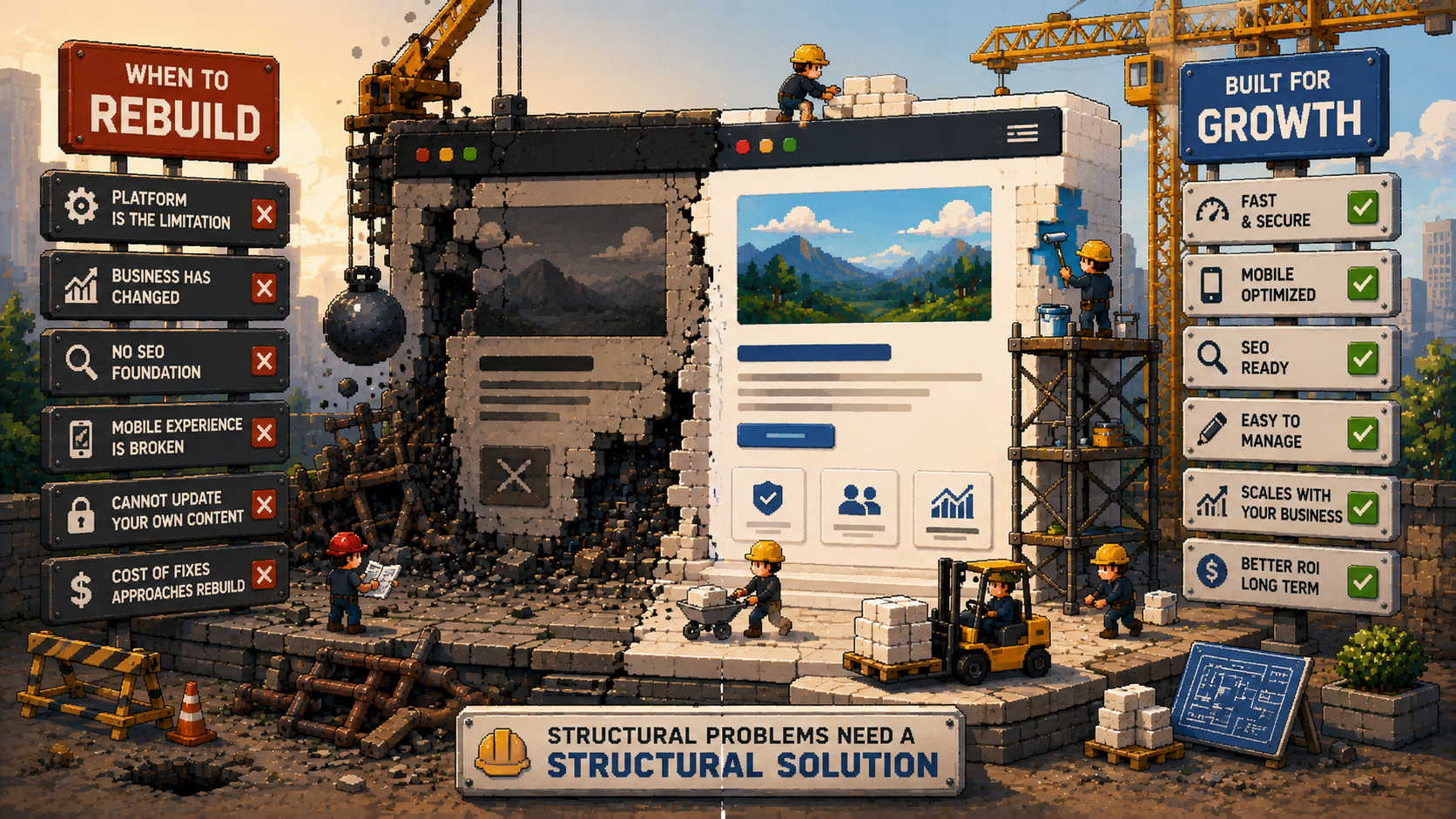
Rebuild when the problems are structural and cannot be effectively solved by working within the existing framework.
The platform itself is the limitation.
Some website builders, particularly older proprietary ones or severely outdated WordPress installations, simply cannot be made to perform properly. If you have optimized everything visible and the site is still slow, still broken on mobile, or still generating security warnings, the platform may be the ceiling that no amount of surface work can raise.
Your business has changed significantly since the site was built.
If your services have expanded, your target audience has shifted, or you are repositioning your brand, and the current site structure no longer reflects what your business actually does today, rebuilding provides the flexibility needed to support where the business is going. A patched site built around your old positioning will always feel misaligned regardless of how many updates you make.
The site was built without any SEO foundation.
If your current site has no proper heading structure, no meta titles, no sitemap, and was built on a platform that makes these difficult to add retroactively, the cost of retrofitting proper SEO structure often approaches the cost of rebuilding cleanly. At that point, a clean build is more efficient and produces a better long-term result.
The mobile experience is broken at the structural level.
Some older sites were built for desktop and given a crude mobile version as an afterthought. If the mobile experience requires a complete rethink of layouts, navigation, and content hierarchy, a rebuild is usually faster and more effective than trying to force a fundamentally desktop-built site to work properly on the devices that now carry the majority of your traffic.
You cannot update your own content.
If your site is locked on a proprietary platform or built in a way that makes any change require going back to the designer, you have a growing cost problem that compounds over time. A rebuild on a proper content management system solves it permanently.
The total cost of fixes approaches the cost of a proper build.
This is the practical tipping point. If you have already spent significant money patching an underperforming site, or the list of fixes needed is long enough that their combined cost approaches a professional rebuild, rebuild. You get a better result, a longer useful lifespan, and stop the pattern of incremental spend on a broken foundation.

The Middle Option Most People Do Not Consider
Is there something between a full rebuild and minor fixes?
Yes. A strategic redesign, not a visual refresh and not a full rebuild, is often the right answer for businesses whose site has a solid technical foundation but needs significant work on messaging, conversion architecture, and SEO structure.
This approach keeps the platform and the underlying code, rebuilds the page templates and visual design, rewrites the content, restructures the information architecture, and properly implements the SEO foundation. It costs significantly less than a full rebuild and produces meaningfully better results than surface-level fixes.
For many service businesses with a three-to-five-year-old site that still loads reasonably well on mobile, this is the most cost-effective path. It is also the option most agencies do not proactively offer because a full rebuild is a larger project.
At The PixelSeed Studio, we distinguish between these three scopes in every proposal: surface optimization, strategic redesign, and full rebuild. We match the recommendation to what the site actually needs, not to what produces the largest invoice. Ask any designer you are evaluating whether they offer this distinction before assuming the only options are patch or start over.
A Decision Framework You Can Apply Today
How do I decide between redesign and rebuild for my specific website?
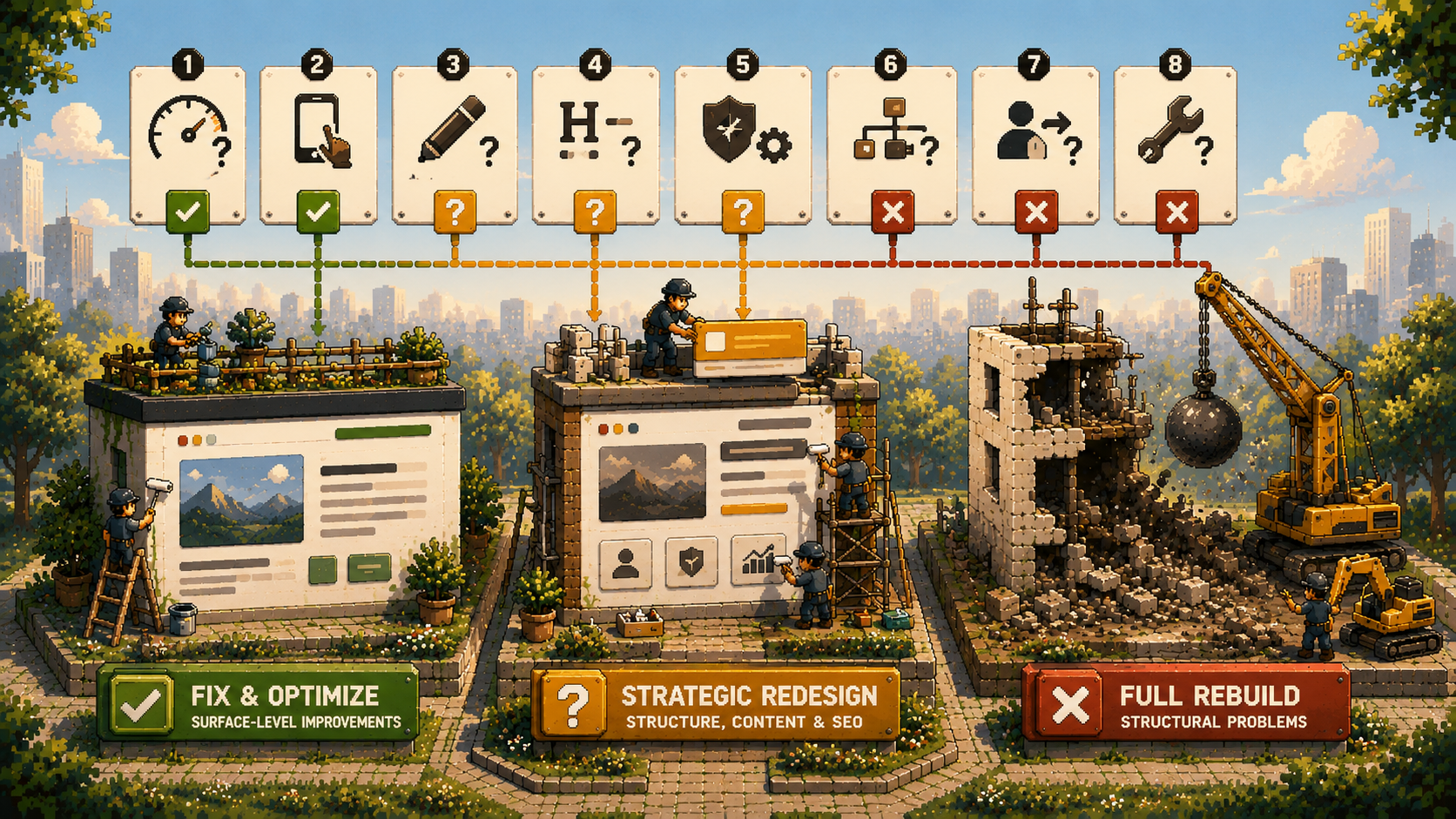
Answer these eight questions honestly. The pattern of your answers will tell you what you actually need.
- Does your site load in under three seconds on mobile? (Check pagespeed.web.dev)
- Is your site genuinely easy to use on a phone, not just technically responsive?
- Can you update your own content without calling a developer?
- Does your site have a clear heading structure and proper meta titles on every page?
- Is your current platform still actively supported and capable of modern performance?
- Does your site structure still reflect what your business actually does today?
- Has your target client or your core offer changed significantly since the site was built?
- Are the main problems with the site at the content and messaging level, or the technical and structural level?
Mostly yes, problems are surface-level:
Fix and optimize. You do not need a rebuild. Start with messaging, trust signals, and calls to action.
Mixed answers, some structural issues:
Strategic redesign. Keep the platform, rebuild the templates, rewrite the content, fix the SEO foundation.
Mostly no, structural problems throughout:
Full rebuild. Further patching will cost more in total than starting properly, and you will lose leads the entire time you are patching.

What to Do Before You Talk to Any Designer
Before you call anyone, run these three free checks on your existing site. They give you an honest picture of where the problems actually are and prevent the conversation from defaulting to "you probably need a new website" before a real diagnosis has happened.
Google PageSpeed Insights (pagespeed.web.dev):
Your performance baseline. Mobile score below 50 is a structural concern. Above 70 means the platform is capable. Above 85 is strong.
Google Search Console:
Shows you what Google sees on your site, what is indexed, what is ranking, and what technical errors exist. If you have never set it up, do it before any design conversation. It is free.
Your own phone:
Visit your site on mobile as a stranger would. Can you find what you need? Can you contact the business easily? Does anything feel broken or difficult? Your experience is your visitors' experience.
Bring the results of these three checks to every designer conversation. Any professional who bypasses these and jumps straight to a proposal without understanding your current baseline is not approaching your project with the diagnostic rigor it deserves.

Frequently Asked Questions